Dictionary
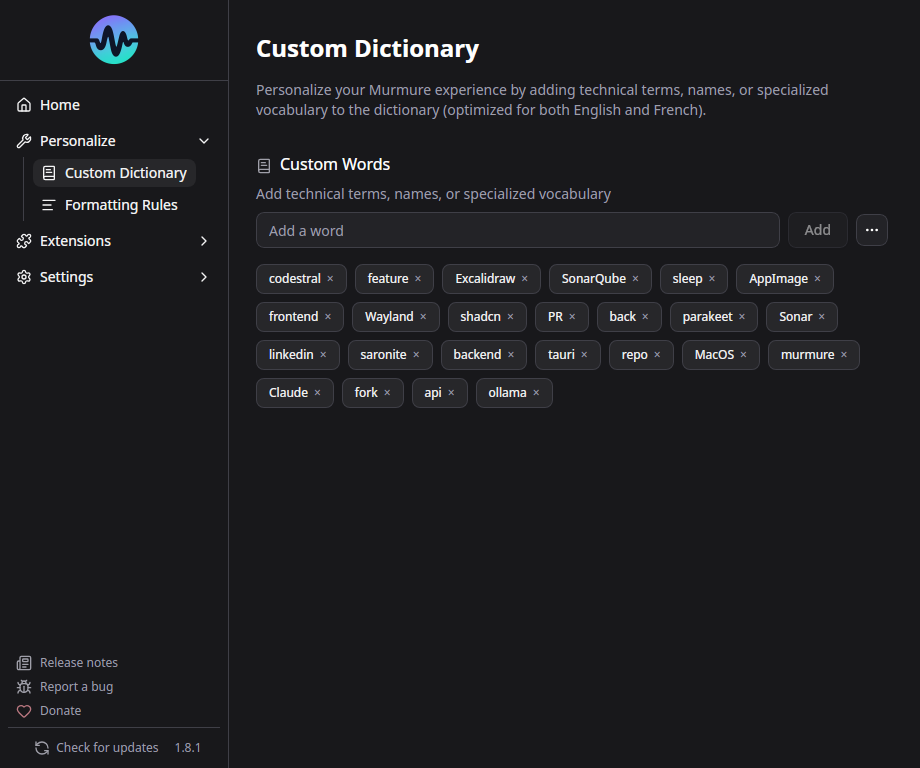
The dictionary helps Murmure recognize words it might otherwise miss or misspell - proper nouns, technical terms, brand names, etc.
How It Works
Dictionary words are boosted directly inside the ASR decoding: when the audio is compatible with one of your entries, Parakeet is nudged toward transcribing it. A spelling correction pass then fixes near-misses, but only when the model was not confident about what it heard, so common words you clearly pronounced are never replaced by dictionary entries.
Example: You add "Kieirra" to the dictionary. When you say "Kieirra" and Parakeet would have transcribed "Kierra" or "Kyera", the dictionary corrects it to "Kieirra".
Adding Words
- Go to Settings > Dictionary (or the Personalize section)
- Type the word and click Add
- The word is immediately active for future transcriptions
Best Practices
Less is more
The dictionary works best with a small, targeted list of words. Every entry is a candidate the decoder considers, so hundreds of entries increase the risk of false positives.
Do:
- Add proper nouns that Parakeet consistently gets wrong (company names, people's names)
- Add technical terms specific to your field
- Add acronyms that should be capitalized (e.g., "LAMOTRIGINE", "NestJS")
Don't:
- Add entire medication lists or full glossaries
- Add common words that Parakeet already handles well
- Add words with numbers (not supported - use Formatting Rules instead)
What Happens With a Large Dictionary?
Safeguards scale down automatically: the decoding boost gets weaker as the dictionary grows, and the spelling correction pass is disabled entirely beyond 100 entries (exact matches keep their dictionary casing). Only add words that are frequently mis-recognized.
Dictionary Limitations
- No digits - Entries containing numbers are rejected. Use Formatting Rules instead
- One or two words - An entry may contain at most one space
- No context understanding - Words are matched by sound and spelling, not by meaning
Letters, accents, punctuation and hyphens are supported.
For complex replacements (multi-word, with numbers, context-dependent), use Formatting Rules with regex instead.
Import / Export
You can import and export your dictionary for backup or sharing:
- Export: Saves your dictionary as a
.txtfile - Import: Loads entries from a
.txtfile and merges them with your current dictionary - Clear all: Removes all dictionary entries
File format
The dictionary file is a plain text file with one entry per line:
Kubernetes
Parakeet
Murmure
- UTF-8 encoding
- Empty lines are ignored
- Leading and trailing spaces are removed
- Each entry must follow the dictionary rules: no digits, one space at most
Importing adds entries to your dictionary, it never replaces it. Entries already present are skipped, whatever their casing.
Older .csv exports
Murmure used to export dictionaries with a .csv extension. Those files are still accepted on import. If a line contains a comma or a semicolon, only the part before the first separator is kept, and a leading header line such as word is ignored. To import a file as is, rename it to .txt.
Medical presets are available for common medical terminology.