CLI
Murmure provides a command-line interface for two purposes: controlling the running instance via one-shot commands (useful for OS-level custom shortcuts), and importing configuration files for deployment or sharing.
Control commands
These commands communicate with the running Murmure instance. If Murmure is not running, it starts first and the command runs once the app is ready. The only exception is --quit, which does nothing when Murmure is not running.
| Command | Description |
|---|---|
murmure --transcription |
Toggle standard transcription ON/OFF |
murmure --transcription-command |
Toggle transcription in Command mode |
murmure --paste-last |
Paste the last transcription, even when Automatic insert is off |
murmure --cancel |
Cancel the current recording and return to idle |
murmure --voice-mode |
Toggle Voice Mode ON/OFF |
murmure --quit |
Quit Murmure completely |
murmure --llm-mode 1 |
Start transcription with LLM prompt 1 |
murmure --llm-mode 2 |
Start transcription with LLM prompt 2 |
murmure --llm-mode 3 |
Start transcription with LLM prompt 3 |
murmure --llm-mode 4 |
Start transcription with LLM prompt 4 |
murmure --llm-transform 1 |
Apply LLM prompt 1 to the selected text |
murmure --llm-transform 2 |
Apply LLM prompt 2 to the selected text |
murmure --llm-transform 3 |
Apply LLM prompt 3 to the selected text |
murmure --llm-transform 4 |
Apply LLM prompt 4 to the selected text |
These commands are primarily used on Linux Wayland to bind OS-level custom shortcuts. See Configure shortcuts on Linux for setup instructions per desktop environment.
Start hidden
Add --hidden to start Murmure without showing the main window. It is useful when a control command starts Murmure, so the app stays in the tray instead of opening its window.
--hidden also applies when Murmure is already running. The existing instance keeps its window hidden instead of bringing it to the front.
Import command
Starting from version 1.8.0, Murmure can import configuration files. This is useful for IT administrators deploying Murmure across multiple workstations or for sharing settings between machines.
Usage
Commands
| Command | Description |
|---|---|
murmure --help |
Show help |
murmure --version |
Show version |
murmure import <FILE> |
Import a .murmure configuration file |
murmure import <FILE> --strategy replace |
Replace all settings (default) |
murmure import <FILE> --strategy merge |
Merge with existing settings |
Import Strategies (import command)
- replace (default) - Overwrites all existing settings with the imported ones
- merge - Keeps existing settings and adds new ones from the import file. Existing values are preserved.
Platform-Specific Paths
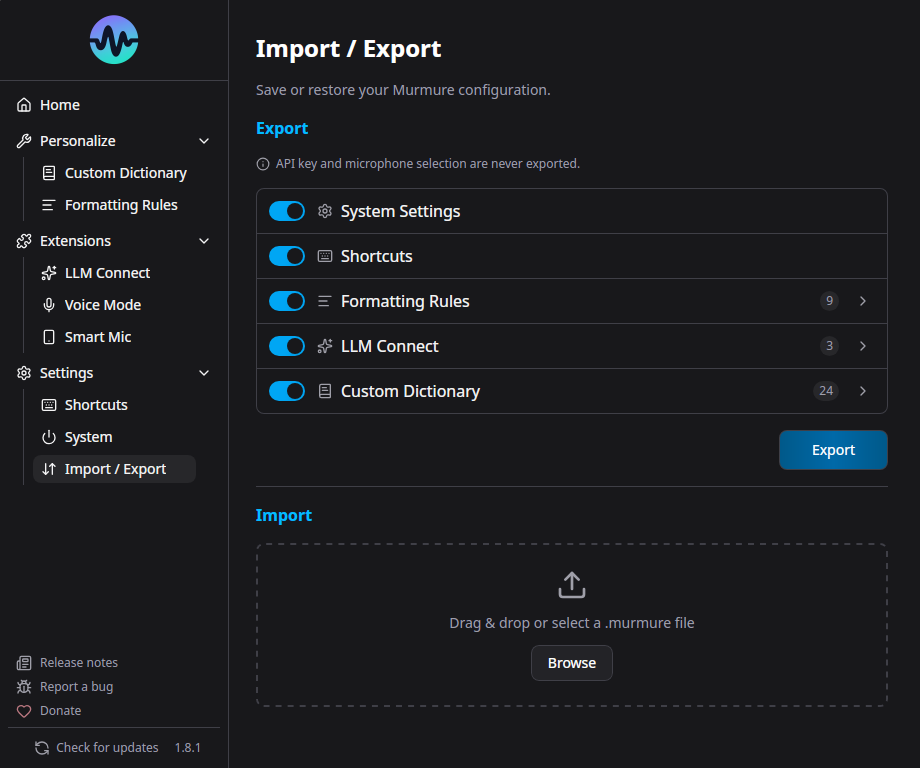
The .murmure File Format
The .murmure file is a JSON file with the following structure:
{
  "version": 1,
  "settings": { ... },
  "shortcuts": { ... },
  "formatting_rules": { ... },
  "llm_connect": { ... },
  "dictionary": { ... }
}
Each section is optional - you can import only the parts you need.
Use Cases
IT Mass Deployment
Combine with silent MSI install for deploying pre-configured Murmure:
# Install silently
msiexec /package Murmure_x64.msi /quiet

# Import company configuration
murmure.exe import company-config.murmure
Sharing Settings
Export your settings from Murmure, share the .murmure file, and the recipient imports it:
Notes
- CLI operations are fast - they detect early and skip full app initialization
- If Murmure is already running, the import triggers a hot-reload of settings
- The import validates the file format and version before applying