Smart Speech Mic
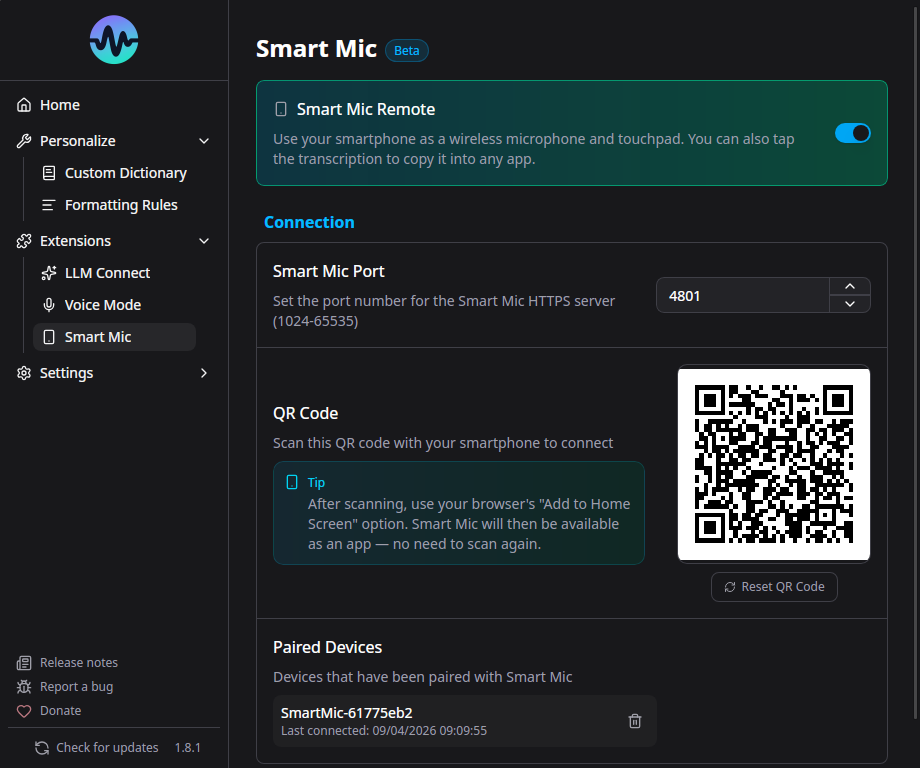
Smart Speech Mic turns any smartphone into a wireless microphone for Murmure. No app installation required on the phone - just scan a QR code.
How It Works
- Murmure starts a secure local HTTPS server on your computer
- A QR code is displayed in the app
- You scan the QR code with your phone's camera
- Your phone opens a web page that streams audio to Murmure over WebSocket
- Murmure uses the phone audio as its microphone input
Setup
- Go to Extensions > Smart Speech Mic
- Enable Smart Speech Mic
- A QR code appears on screen
- Scan it with your phone (both devices must be on the same network)
- Allow microphone access in your phone's browser
- Start recording in Murmure as usual
Requirements
- Both devices must be on the same local network (Wi-Fi)
- Your phone needs a modern browser (Chrome, Safari, Firefox)
- Microphone permission must be granted in the phone browser
Security
- Communication is encrypted via TLS (HTTPS + WSS)
- Self-signed certificates are generated locally
- Device pairing uses tokens stored in your system's native keyring
- No data leaves your local network
Managing Paired Devices
You can view and remove paired devices in the Smart Speech Mic settings. Removing a device revokes its pairing token.
Configuration
- Port: The server port can be changed in settings if the default conflicts with another service
- Enable/Disable: Toggle the Smart Mic server on/off as needed