Dictionary
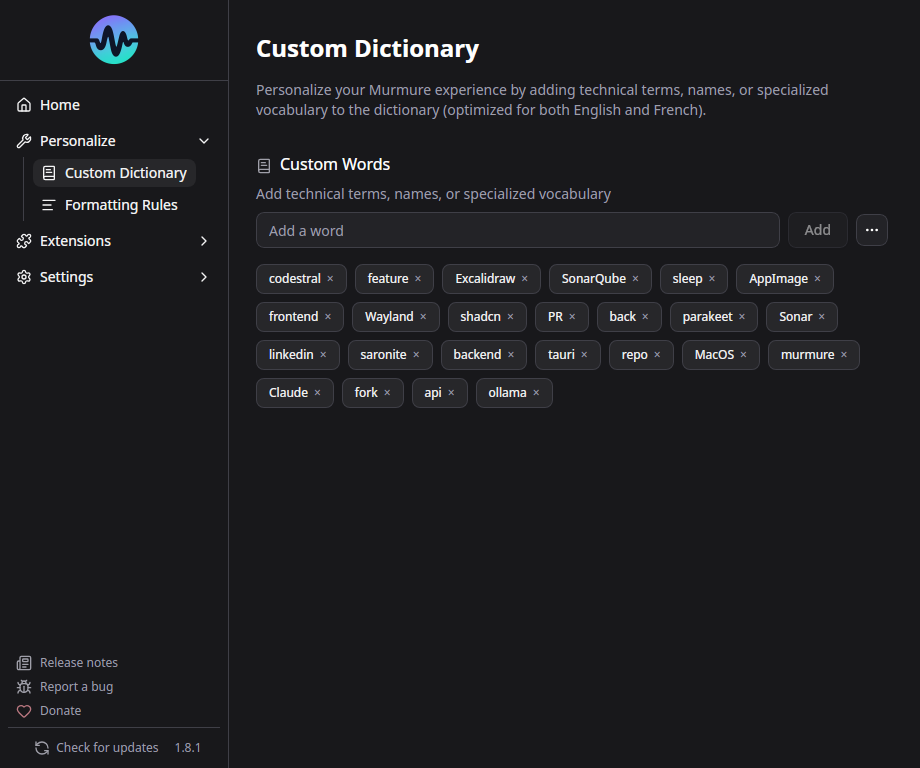
The dictionary helps Murmure recognize words it might otherwise miss or misspell - proper nouns, technical terms, brand names, etc.
How It Works
Murmure uses a phonetic matching algorithm (Beider-Morse) to compare what Parakeet transcribed against your dictionary entries. If a spoken word sounds similar to a dictionary entry, it's replaced.
Example: You add "Kieirra" to the dictionary. When you say "Kieirra" and Parakeet transcribes "Kierra" or "Kyera", the dictionary corrects it to "Kieirra".
Adding Words
- Go to Settings > Dictionary (or the Personalize section)
- Type the word and click Add
- The word is immediately active for future transcriptions
Best Practices
Less is more
The dictionary works best with a small, targeted list of words. Adding too many entries (especially hundreds of similar-sounding words) degrades transcription quality.
Do:
- Add proper nouns that Parakeet consistently gets wrong (company names, people's names)
- Add technical terms specific to your field
- Add acronyms that should be capitalized (e.g., "LAMOTRIGINE", "NestJS")
Don't:
- Add entire medication lists or full glossaries
- Add common words that Parakeet already handles well
- Add words with numbers or special characters (not supported - use Formatting Rules instead)
Why Does a Large Dictionary Hurt Quality?
The phonetic matching algorithm matches aggressively when many similar-sounding entries exist. For example, adding 200 medical terms can cause "a" to be matched to "eau", or random prefixes to appear. Only add words that are frequently mis-recognized.
Dictionary Limitations
- Alphabetical characters only - Numbers, hyphens, and special characters are not supported in dictionary entries
- Single words only - Multi-word phrases are not supported
- Phonetic matching only - The algorithm matches by sound, not by context
For complex replacements (multi-word, with numbers, context-dependent), use Formatting Rules with regex instead.
Import / Export
You can import and export your dictionary for backup or sharing:
- Export: Downloads your dictionary as a file
- Import: Loads words from a previously exported file
- Clear all: Removes all dictionary entries
Medical presets are available for common medical terminology.